Text messages
How texts from po6tive work
PO6TIVE INC. runs po6tive and sends these texts. They go to the clients of shops that use po6tive, about their appointments. Here is who sends them, what they say, how you agree to them, and how to make them stop.
Last updated October 14, 2026
The short version
- PO6TIVE INC. sends these texts, as po6tive. Each one starts with “po6tive:” and names the shop.
- Only if you say yes: at a shop’s check-in kiosk, on its booking page, or at its front desk. Never needed to book.
- Message frequency varies. Message and data rates may apply.
- Reply STOP to opt out, HELP for help.
Who sends them
po6tive is operated by PO6TIVE INC. Contact: hello@po6tive.com
PO6TIVE INC. is the sender. po6tive is its booking and front-desk service for salons, barbershops, nail and tattoo studios, and it texts those shops’ clients about their appointments itself — as “po6tive”, from one po6tive number, in wording po6tive writes. A shop can’t write or change these texts. Each one starts with “po6tive:” and names the shop in its first words, so you always know which appointment it is about.
po6tive never texts you about po6tive itself, never texts a shop’s offers or news, and never texts to ask how a visit went.
A text from a shop’s own phone does not come from po6tive, so replying STOP to it does not reach us. To stop those, tell the shop.
What they say
Appointment texts, and only these:
- Booking confirmations, when an appointment is booked: “po6tive: Hi Jordan, your appointment at SOPHI Beauty Lounge is confirmed for Thu, Oct 15 at 2:30 PM. Reply STOP to opt out, HELP for help.”
- Reminders, before the appointment: “po6tive: Reminder: your appointment at SOPHI Beauty Lounge is tomorrow at 2:30 PM. Reply STOP to opt out.”
- Reschedule and cancellation notices, when an appointment is moved or cancelled: “po6tive: Your appointment at SOPHI Beauty Lounge has moved to Thu, Oct 15 at 3:00 PM. Reply STOP to opt out.”
Every text is worded by po6tive, the same for every shop, with the shop and the appointment filled in. SOPHI Beauty Lounge is shown as an example: each shop’s own name appears in its place.
Nothing else is texted. A shop’s emails are separate and go by email only: updates about your visits, a “how did we do?” after one, and its offers and news if you asked for them.
How you agree
Texts start only when you say yes, in one of three places. Saying yes is never needed to book or check in, and nobody can say it for you. Each yes is followed by one text: “po6tive: You’re subscribed to appointment texts from po6tive for the shops you visit. Msg frequency varies. Msg & data rates may apply. Reply HELP for help, STOP to opt out.”
1. At the shop’s check-in kiosk
The tablet on the front desk. The last screen of your first check-in has a block of its own for texts, under po6tive’s name and logo. It shows the phone number you entered — “Texts go to (416) 555-0123” — and one box, unticked, with these words beside it:
I agree to receive appointment text messages from po6tive (confirmations, reminders and changes) about my visits to shops that use po6tive. Message frequency varies. Message and data rates may apply. Reply STOP to opt out, HELP for help. Terms: po6tive.com/terms · Privacy: po6tive.com/privacy.
Ticking po6tive’s text-message box is your yes. It is never ticked for you, and you can check in without it. The shop’s two email choices sit below it, apart: “Email updates” and “Marketing emails”. Neither of them starts texts. If a shop added you before you ever checked in, the kiosk asks you the same things once, after a check-in, with every box empty.
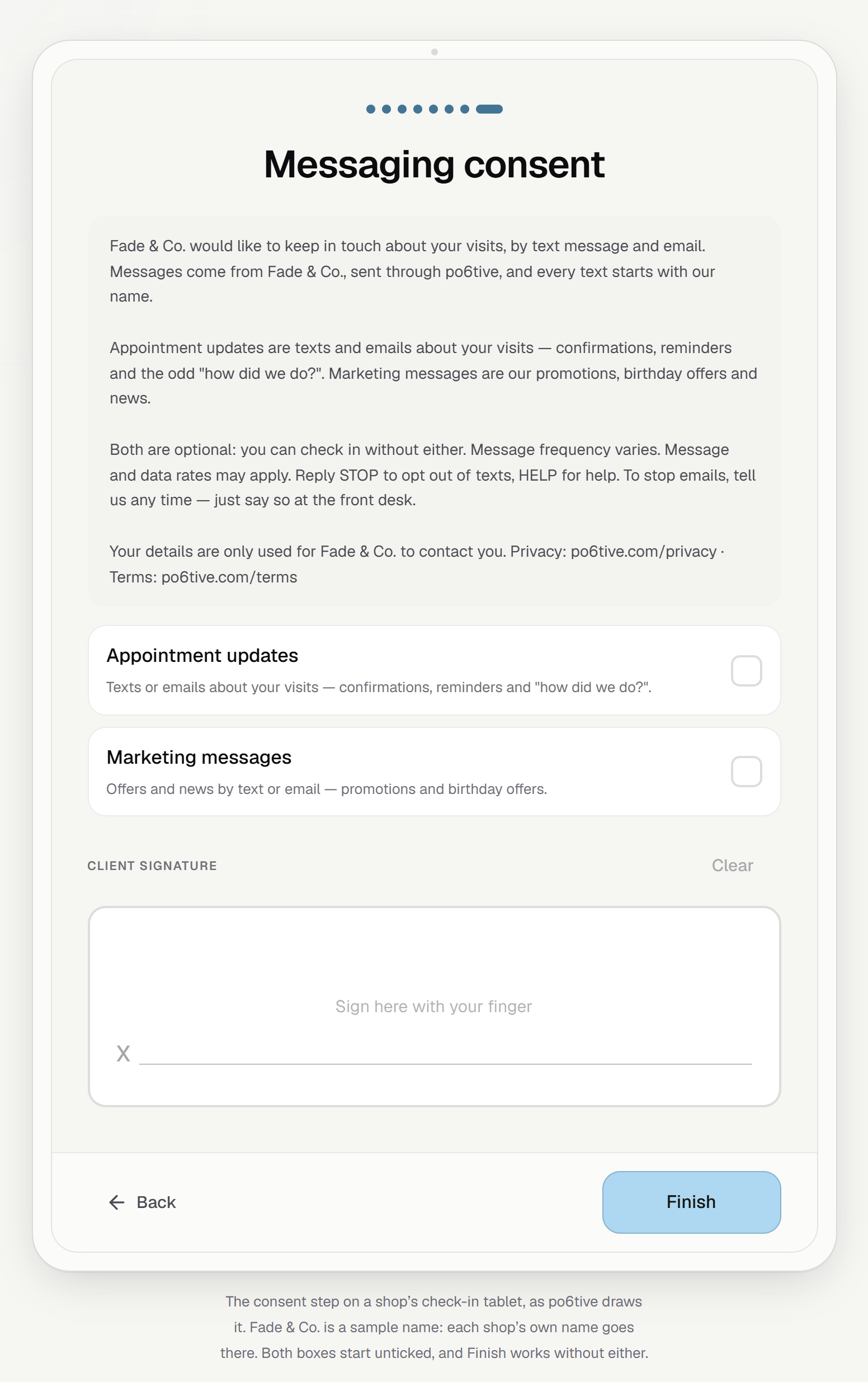
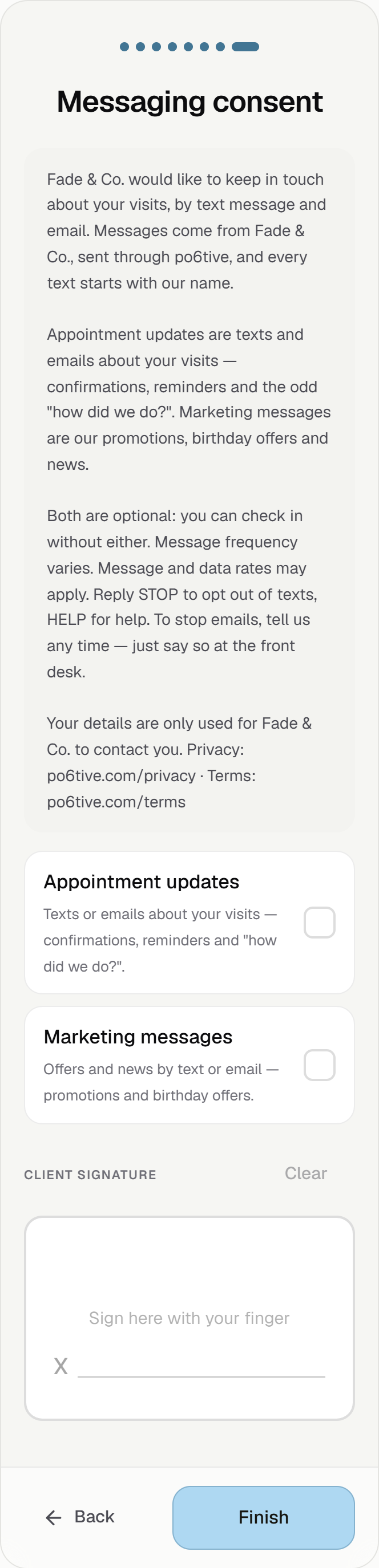
Messaging consent
Text messages
Texts go to (416) 555-0123
Optional. You can check in without ticking this.
SOPHI Beauty Lounge would like to keep in touch about your visits. Everything on this screen is optional: you can check in without ticking anything. Email updates are emails about your visits — confirmations, reminders and the odd "how did we do?". Marketing emails are our offers and news. To stop either, just tell us. Text messages are separate: po6tive sends those for SOPHI Beauty Lounge, and only if you tick the po6tive box. Your details are only used to contact you about your visits here. Privacy: po6tive.com/privacy · Terms: po6tive.com/terms
Emails from SOPHI Beauty Lounge
Email only. Neither of these two is about text messages.
Client signature
The same screen as a picture: on a tablet and at phone width.
2. On the shop’s booking page
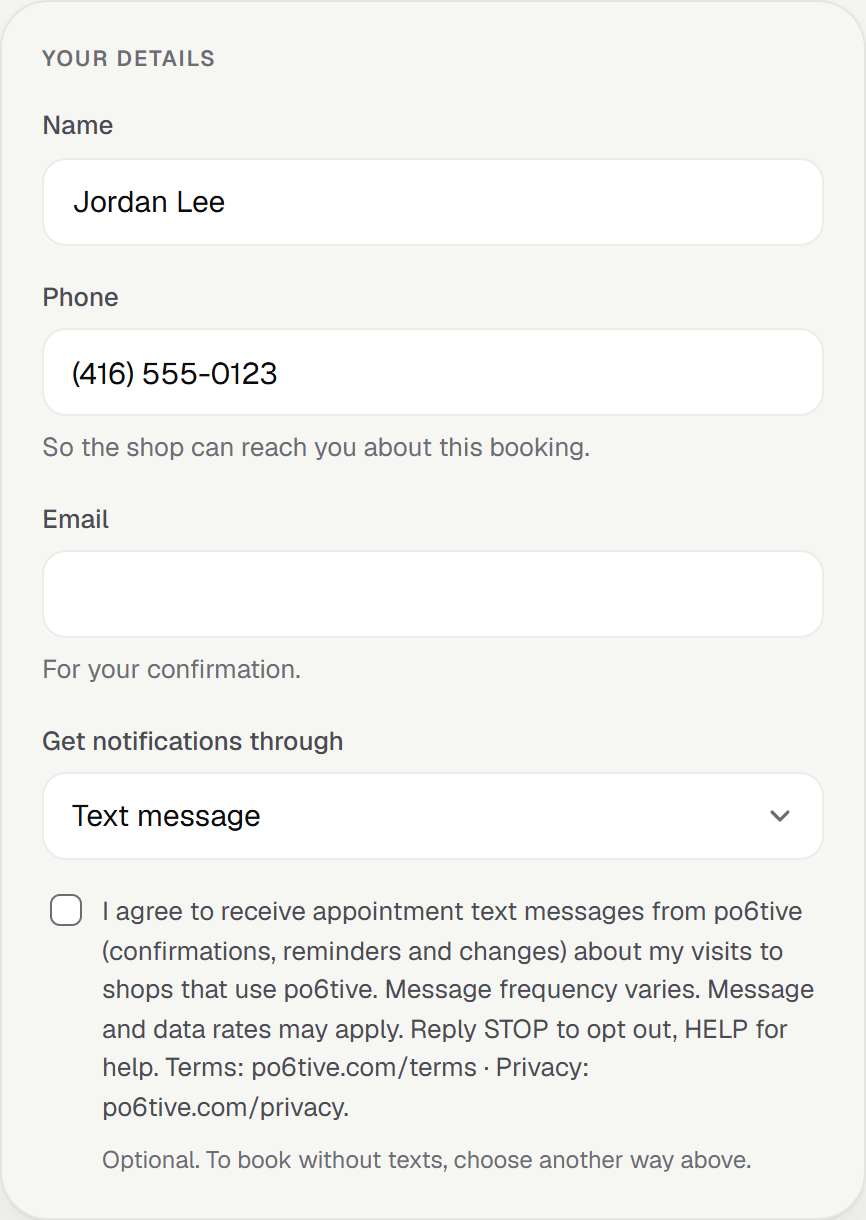
When you book online, you choose how to hear about your booking under “Get notifications through”: Email, Text message, Email and text message, or Don’t send a notification. The list never starts on a text: with an email given it starts on Email, and with only a phone number you have to choose. When you choose a text option, po6tive’s own box appears under it, unticked, with the same words beside it as at the kiosk. Ticking that box is your yes. Under it: “Optional. To book without texts, choose another way above.”
Your details
So the shop can reach you about this booking.
For your confirmation.
The same part of the page as a picture: booking page.
3. At the front desk
When you book by phone or in person, the shop asks you, in these words:
Can po6tive text you about your appointments here? That’s confirmations, reminders and changes. Message and data rates may apply, and you can reply STOP to any text to stop them.
Only if you say yes does the shop turn on “Texts from po6tive” on your record in po6tive, which keeps the date and the name of the person who recorded it. You get the “You’re subscribed” text straight away, so you know, and you can reply STOP to it.
How often, and what it costs
Message frequency varies: it depends on how often you book. Message and data rates may apply, depending on your mobile plan. Carriers are not liable for delayed or undelivered messages.
Stopping texts, and getting help
- Reply STOP to any text and po6tive stops texting you, for every shop that uses po6tive: the texts all come from one po6tive number.
- Reply START to get texts again. Ticking the box at a kiosk says you would like them, but after a STOP po6tive only texts you again once you reply START.
- Reply HELP for help, or email hello@po6tive.com.
- Stopping texts changes nothing else. Your bookings stay booked, and you can still check in.
- Emails are separate. To stop those, tell the shop that sent them.
Your number and your privacy
We do not sell or share your mobile phone number or SMS opt-in consent with third parties or affiliates for their marketing or promotional purposes. Text messaging originator opt-in data and consent are not shared with any third parties. Texts are delivered through Twilio, our messaging provider, only to send them.
The details are in the privacy policy and the terms.
Questions
Email PO6TIVE INC. at hello@po6tive.com. A real person reads every message.